Smart Contract Wallet Drainers: What Is Token Approval Phishing and How to Revoke Malicious Permissions
Wallet drainers can steal crypto without exposing your seed phrase. Learn how token approval phishing works, how to find and revoke malicious smart contract permissions, secure remaining assets, preserve evidence, and respond after a wallet drainer attack.

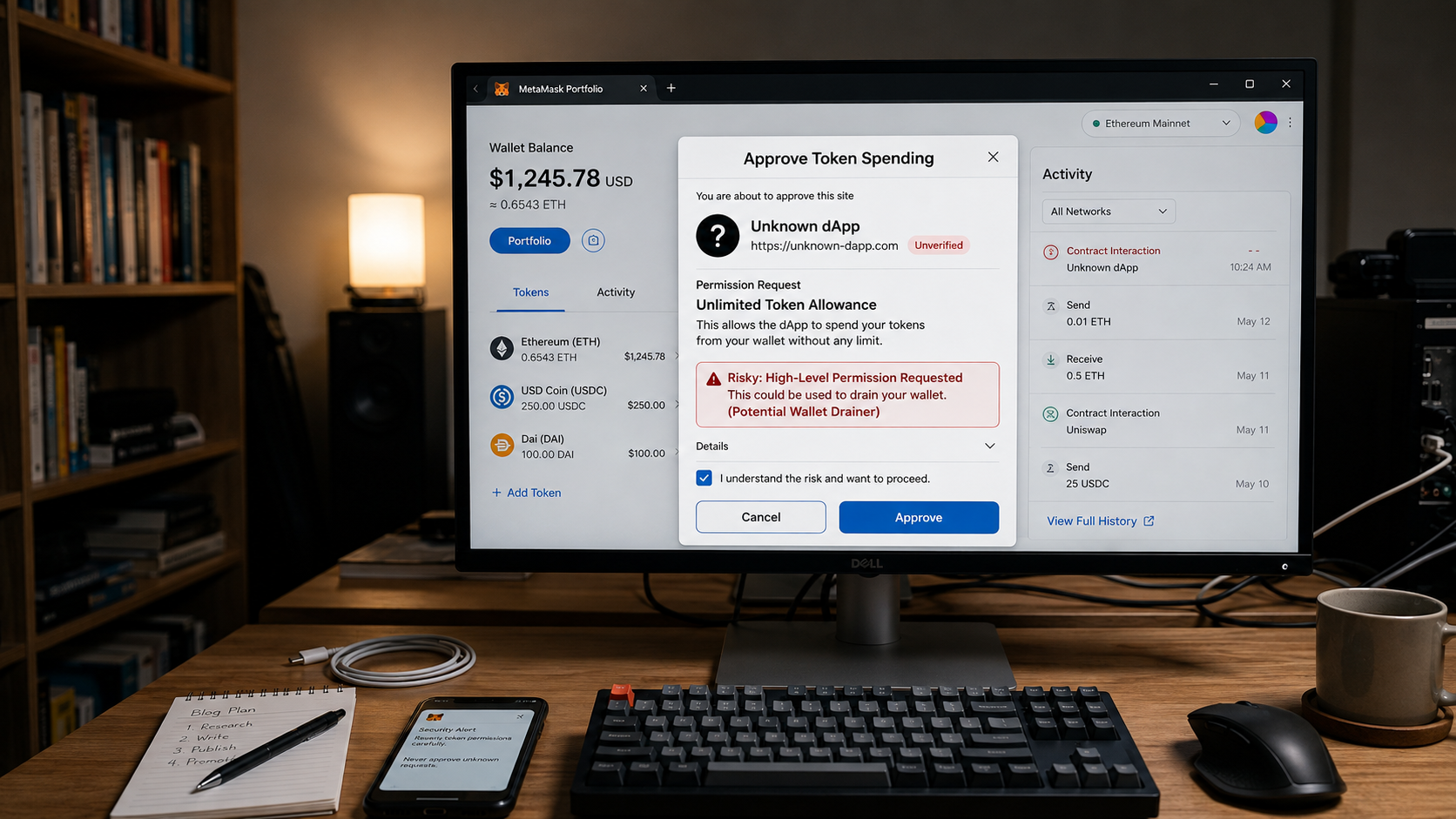
Smart contracts do not need your seed phrase to rob you.
That is the ugly little Web3 trap. A wallet drainer can empty tokens because you signed an approval that gave a malicious contract permission to move assets from your wallet. Your seed phrase may still be private. Your wallet may not be “hacked” in the Hollywood sense. But the contract approval is still sitting there like a loaded gun with your address engraved on it.
If your wallet was siphoned after you connected MetaMask, signed a transaction, minted a fake NFT, joined a fake DeFi page, or “verified” your wallet on a rotten dApp, your first job is not revenge. It is containment. Revoke malicious token approvals, move remaining assets to a clean wallet, preserve evidence, and do not pay some recovery clown who promises to “reverse the blockchain” for an upfront fee.
TL;DR
- A wallet drainer steals crypto by tricking you into signing malicious transactions or token approvals that let a smart contract move your assets.
- The core risk is not always a stolen seed phrase. It may be an active ERC-20, NFT, or multi-chain allowance that still gives a contract permission to drain future deposits.
- Within fifteen minutes, disconnect from the suspicious site, stop depositing funds, use a trusted approval checker such as Etherscan Token Approval Checker or Revoke.cash, and revoke suspicious allowances.
- Crypto recovery depends on chain, timing, exchange cooperation, law enforcement, analytics tracing, and jurisdiction. No one can guarantee recovery just because the theft is visible on-chain.
- If funds are already gone, build the evidence file immediately: wallet address, transaction hashes, scam URL, signed messages, screenshots, timestamps, and exchange deposit addresses if visible.
What Token Approval Phishing Actually Means
Token approval phishing is a scam where a fake or compromised Web3 site tricks you into signing a permission that lets a smart contract spend your tokens.
That permission is called an allowance. In ERC-20 tokens, an allowance lets one address, often a smart contract, transfer a certain amount of your token from your wallet. Legitimate dApps use approvals so you can trade, stake, bridge, mint, lend, or interact with DeFi protocols without signing every tiny movement manually.
Scammers looked at that system and thought: wonderful, a permission slip for theft.
A wallet drainer does not always ask for your seed phrase. That would be too obvious, and these parasites prefer the modern fraud buffet. Instead, the fake site asks you to connect your wallet and sign something that looks routine:
- “Approve token”
- “Set approval for all”
- “Claim reward”
- “Verify wallet”
- “Mint free NFT”
- “Connect to continue”
- “Sign to prove ownership”
- “Upgrade contract”
- “Confirm eligibility”
The screen may look harmless. The actual transaction may grant broad spending rights to a malicious contract. Once that approval is live, the drainer can move approved assets from your wallet.
The same fraud machinery shows up in fake work platforms too, where victims are pushed through staged dashboards, fake balances, and crypto deposits before the trap closes. Dollar Vigil breaks that pipeline down in its guide to task-driven job scams.
No password stolen. No seed phrase exposed. No dramatic hacker hoodie required.
Just a poisoned permission.
Operation Atlantic Showed Why This Is Not Some Tiny Nerd Scam
In April 2026, the UK National Crime Agency announced Operation Atlantic, an international operation co-hosted with the U.S. Secret Service, Ontario Provincial Police, and Ontario Securities Commission. The operation targeted cryptocurrency and investment scammers using approval phishing. Authorities said more than $12 million had been frozen and more than 20,000 victims had been identified. Investigators also linked the operation to more than $45 million in cryptocurrency fraud activity.
That matters because approval phishing is not just “oops, someone clicked a bad NFT link.”
It is organized fraud.
Law enforcement, blockchain analytics firms, exchanges, and private-sector investigators are now treating wallet drainers as a serious fraud pipeline. Chainalysis has described Operation Atlantic as focused on approval phishing scams that trick victims into granting criminals permission to drain wallets. Recorded Future News has also reported on approval phishing losses and law enforcement efforts to trace compromised wallets, warn victims, and disrupt accounts.
Translation: this is not a weird edge case from Crypto Twitter’s basement. It is industrialized theft wearing a Web3 interface.
How a Wallet Drainer Siphons Your MetaMask Without Your Seed Phrase
A wallet drainer usually works in five steps.
- The lure appearsThe victim sees a fake NFT mint, token airdrop, investment dashboard, staking portal, support page, compromised project website, malicious ad, fake e-commerce page, impersonated dApp, or urgent message pushing them toward a wallet connection. If the pressure involves a fake family emergency, voice message, or impersonated relative, compare the manipulation pattern with Dollar Vigil’s guide to AI voice cloning scams. Different costume, same criminal dependence on panic.
- The wallet connection feels normalThe site asks the victim to connect MetaMask, Coinbase Wallet, Trust Wallet, Rabby, Phantom, or another wallet. Connecting alone does not usually give spending access. The real danger starts when the site asks for a signature or approval.
- The signature gives permissionThe victim signs a transaction or message. It may approve a token allowance, approve NFT transfers, trigger a malicious contract call, or authorize a permit-style transfer depending on the chain and token standard.
- The drainer moves assetsThe malicious contract or attacker-controlled address transfers approved tokens, NFTs, or other assets. Some drainers prioritize high-value assets first. They are not politely browsing your wallet like a museum guest. They are looting by script.
- The funds are routed awayStolen assets may move through new wallets, decentralized exchanges, bridges, mixers, instant swaps, or deposit addresses at exchanges. The trail may still be visible, but visibility is not the same as control.
The important distinction: if only token approvals were abused, your seed phrase may not be compromised. But if you entered your seed phrase, installed malware, downloaded a fake wallet, approved a malicious browser extension, or signed multiple suspicious transactions, assume the wallet environment is dirty until proven otherwise.
Approval Abuse Versus Seed Phrase Theft
This distinction decides what you do next. Get it wrong and you may either abandon a wallet unnecessarily or, worse, keep depositing funds into a live theft machine.
| Situation | What likely happened | Immediate risk | What to do |
|---|---|---|---|
| You connected wallet and approved a token | Malicious allowance | Approved assets can be drained | Revoke approvals and move remaining assets |
| You signed “set approval for all” for NFTs | NFT operator approval | NFTs in that collection can be moved | Revoke NFT approvals immediately |
| You entered your seed phrase on a website | Seed phrase compromise | Entire wallet can be controlled | Move all assets to a new wallet immediately |
| You installed a fake wallet app or extension | Device or wallet compromise | Future activity may be monitored or hijacked | Use a clean device and new wallet |
| You only connected wallet but signed nothing | Usually lower risk | Site may know your address, but may not spend | Disconnect, check approvals, monitor activity |
| You deposited more funds after the incident and they vanished | Active approval or key compromise | Wallet remains unsafe | Stop deposits, revoke approvals, migrate assets |
The scammer wants confusion. Confusion buys time. Time lets the drainer finish eating.
What to Do in the First Fifteen Minutes
The first fifteen minutes are not for arguing with the scam site’s fake support widget. That little sewer puppet is not helping you. It may be there to keep you calm while the wallet gets scraped.
Do this instead.
1. Stop using the suspicious site
Close the tab. Do not click “disconnect” buttons inside the scam page if the page keeps prompting signatures. Use your wallet’s own interface to disconnect the site.
In MetaMask, check connected sites and remove the suspicious domain. This does not revoke on-chain approvals by itself, but it cuts the live browser connection.
2. Do not deposit new funds into the wallet
If an approval is still active, adding more tokens may just refill the scammer’s plate. Do not test the wallet with meaningful funds. Do not send in “just enough gas” unless you understand the risk.
If you need gas to revoke approvals, consider sending only the minimum required from a separate clean wallet. Even then, move carefully. Some compromised wallets are watched by sweeper bots that instantly steal incoming native coins used for gas.
3. Check token approvals
Use trusted approval tools. Common options include:
- Etherscan Token Approval Checker for Ethereum.
- Revoke.cash for Ethereum and many EVM-compatible chains.
- DeBank approval tools or other reputable wallet security dashboards.
- Chain-specific explorers where available, such as BscScan, Polygonscan, Arbiscan, Basescan, or similar explorers.
Type the domain manually or use official links from the block explorer. Do not click a random “revoke tool” ad. The recovery-scam circus loves buying those keywords after the fire starts.
4. Revoke suspicious allowances
Look for:
- Unlimited approvals.
- Contracts you do not recognize.
- Approvals created around the time of the scam.
- Approval entries connected to the fake site, fake mint, fake trading portal, or suspicious dApp interaction.
- NFT approvals such as “set approval for all.”
- Permit or signature-based approvals if supported by the tool.
Revoke anything suspicious. If you are unsure, revoke more aggressively. You can approve legitimate dApps again later. Convenience can wait. Containment cannot.
5. Move remaining assets to a clean wallet
If valuable assets remain, move them to a new wallet created on a clean device or trusted hardware wallet. Do not reuse the same seed phrase. Do not import the old seed phrase into the new wallet and call it security. That is not a fresh wallet. That is the same burning house with new curtains.
If you suspect seed phrase compromise or malware, prioritize moving assets over carefully pruning approvals. But watch the gas issue. Sweeper bots can steal gas the moment it arrives.
How to Revoke Smart Contract Allowances on Etherscan
For Ethereum tokens, Etherscan offers a token approval checker that can show contracts approved to spend tokens from your wallet.
The basic process is:
- Go to the official Etherscan website.
- Open the token approval checker.
- Connect your wallet or enter your public wallet address.
- Review token approvals.
- Identify suspicious spenders, especially unlimited approvals.
- Click revoke.
- Confirm the revocation transaction in your wallet.
- Wait for the transaction to confirm on-chain.
- Recheck the approvals after confirmation.
A revocation is an on-chain transaction. That means it costs gas. It also means it must confirm before the permission is actually removed.
Do not assume clicking “revoke” in a web interface magically saved you. Confirm the transaction hash. Then verify the allowance changed.
Scammers live in the gap between what victims think happened and what the blockchain actually recorded.
How to Check Which Contracts Have Access to Your Tokens
You can check approvals by chain.
For Ethereum and many EVM chains, search the wallet address in a reputable approval checker. Review allowances by token, spender contract, and permission size.
Focus on four things:
- Spender address: Which contract or address can move the asset?
- Approved token or NFT: What asset is exposed?
- Allowance amount: Is it limited or unlimited?
- Approval date: Was it created during the suspicious interaction?
If the tool labels a spender as unknown, that does not automatically mean fraud. Plenty of legitimate contracts are poorly labeled. But if an unknown contract got unlimited approval minutes before your wallet was drained, congratulations, you found the corpse outline.
For NFTs, check operator approvals. A “set approval for all” permission can let a marketplace or malicious operator transfer NFTs in a collection. Legitimate marketplaces use this. Fake mint pages abuse it.
For Solana, Bitcoin, and non-EVM ecosystems, the approval model differs. Do not blindly follow Ethereum instructions on another chain. Use chain-specific wallet security tools and official explorer guidance.
Should You Keep Using The Same Wallet Address?
If your seed phrase was not exposed and you revoked every malicious approval, the address may technically be usable. Technically.
But “technically usable” is not the same as “sensible place to store serious money.”
Use this decision rule:
| Risk factor | Safer decision |
|---|---|
| You only signed one token approval and revoked it | Wallet may be reusable for low-risk activity, but monitor it |
| You signed multiple unknown transactions | Move assets to a clean wallet |
| You entered your seed phrase anywhere | Abandon the wallet for storage purposes |
| You installed a fake wallet app or browser extension | Use a clean device and new wallet |
| New deposits vanish instantly | Treat wallet as actively compromised |
| You cannot identify what you signed | Move assets and retire the wallet for serious holdings |
| High-value assets remain | Move to a hardware wallet or freshly secured wallet |
For most victims, the cleanest answer is this: revoke approvals, rescue what remains, and use a new wallet for future funds.
The old wallet can still be useful for evidence. It should not be your vault.
What Recovery Is Realistically Possible After a Wallet Drainer
Crypto recovery is difficult because blockchain transactions are usually irreversible. That is the part the fake recovery industry conveniently forgets while waving “guaranteed retrieval” around like a coupon for magic.
Real recovery usually depends on one of these events:
- Stolen funds reach a centralized exchange that can freeze them.
- Law enforcement or a blockchain analytics firm identifies the flow quickly.
- A stablecoin issuer or platform can freeze specific assets where technically and legally possible.
- The scam is part of a larger investigation, such as a law enforcement operation.
- The attacker makes an operational mistake.
- The funds are still sitting in a traceable wallet and have not been bridged, mixed, swapped, or cashed out.
Even then, tracing funds does not equal getting funds back.
A blockchain investigator may identify a deposit address. An exchange may require a law enforcement request. A police agency may or may not act quickly. A civil lawyer may need a court order. A stablecoin issuer may have policies and legal thresholds. Every step has friction. Fraud recovery is not a vending machine.
Evidence to Preserve Before the Trail Gets Messy
Build the file immediately. Do not rely on memory. Panic is a terrible filing system.
Save:
- Your wallet address.
- All suspicious transaction hashes.
- Token approval transaction hashes.
- Revocation transaction hashes.
- Scam website URL.
- Screenshots of the fake dApp, mint page, dashboard, or support chat.
- Browser history showing the domain.
- Wallet pop-up screenshots if available.
- Discord, Telegram, X, email, SMS, or ad messages that led you there.
- Names and handles used by the scammer.
- Destination wallet addresses.
- Any centralized exchange deposit address visible in the trail.
- Dates, times, timezone, token names, token contract addresses, and approximate values.
- Device details if malware or fake wallet software may be involved.
Use transaction hashes, not just screenshots. Screenshots are useful, but transaction hashes are the evidence skeleton. The blockchain does not care how stressed you were. It records addresses, contracts, timestamps, and movements.
Where to Report a Wallet Drainer
Reporting depends on your country and the platform involved.
Useful reporting routes may include:
- Local police or cybercrime reporting center.
- National fraud reporting portals.
- The exchange where stolen funds appear to land.
- The wallet provider, if their interface was impersonated or abused.
- The domain registrar or hosting provider for the phishing site.
- The platform where the lure appeared, such as X, Discord, Telegram, Google Ads, or a compromised project community.
- Blockchain analytics support channels where available.
- Stablecoin issuer reporting channels if stolen assets involve freeze-capable tokens.
In the United States, victims may report crypto-related internet crime to the FBI’s Internet Crime Complaint Center. In the UK, Action Fraud and police reporting routes may be relevant, while the National Crime Agency handles serious organized crime intelligence rather than individual consumer support in every case. In Canada, victims may report to local police and the Canadian Anti-Fraud Centre. In Australia, ReportCyber may be relevant.
Rules and portals change. Use official government sites, not sponsored ads.
And do not pay a stranger on Instagram who says they have a “blockchain department contact.” That is not a department. That is a second mugging wearing a lanyard.
Red Flags That the Revocation Help Is Also a Scam
After a wallet drainer incident, victims are targeted again. Recovery scammers know the victim is scared, embarrassed, and desperate. That is their favorite hunting weather.
Walk away if someone says:
- “Guaranteed recovery.”
- “We can reverse the transaction.”
- “Pay gas to unlock your recovered funds.”
- “Send us your seed phrase so we can inspect the wallet.”
- “We work with MetaMask/Etherscan/Interpol but cannot show proof.”
- “Your stolen crypto is in a smart contract and needs a release fee.”
- “We recovered it, but you must pay tax first.”
- “Use this private revocation link.”
- “Install this remote access app.”
- “Deposit more funds so the wallet can validate.”
This second-stage pressure campaign is not unique to crypto. Seniors are also pushed into liquidation traps, including gold courier scams, where criminals convert savings into movable assets and send couriers to collect the loot like fraud suddenly became a delivery service.
Real investigators do not need your seed phrase. Legitimate tools do not need you to pay a mysterious “release charge.” Law enforcement does not recover crypto through Telegram DMs with anime profile pictures.
The first scam drained the wallet. The second scam drains the hope.
Common Mistakes That Keep The Wallet Exposed
The most expensive mistakes are usually simple.
Mistake 1: Disconnecting the site and thinking approvals are revoked
Disconnecting a site in MetaMask only removes the current connection permission from the browser interface. It does not automatically remove on-chain token allowances.
You must revoke approvals on-chain.
Mistake 2: Sending more funds into the same wallet
If the drainer still has permission or the seed phrase is compromised, new deposits can vanish. This is especially brutal when victims send gas into a compromised wallet and a sweeper bot steals it instantly.
Mistake 3: Revoking only one token
Drainers may create multiple approvals across tokens, NFTs, and chains. Check all chains you used. Ethereum, BNB Chain, Polygon, Arbitrum, Base, Optimism, Avalanche, and others may each have separate approvals.
Mistake 4: Trusting fake revocation ads
Search ads for crypto recovery and revocation can be poisoned. Use official block explorers, verified wallet documentation, or well-known tools typed manually.
Mistake 5: Assuming visible funds are safe
If assets remain in the wallet, they may simply not have been targeted yet, may require gas to move, or may be on another chain the drainer has not processed. Move valuable assets once you have a safe path.
Myth Versus Reality
| Myth | Reality |
|---|---|
| “If I still have my seed phrase, I am safe.” | Not if you approved a malicious contract. A wallet drainer can use permissions without knowing your seed phrase. |
| “Revoking approvals brings back stolen tokens.” | Revoking stops future approved transfers. It does not reverse completed theft. |
| “Connecting my wallet stole everything.” | Connection alone is usually not enough. The dangerous part is the signature, approval, or transaction you confirmed. |
| “The blockchain can reverse it.” | Most crypto transfers are irreversible unless funds are frozen by a platform, issuer, court process, or law enforcement action. |
| “A recovery expert can guarantee results.” | Guaranteed crypto recovery is usually bait. Real recovery depends on tracing, timing, cooperation, and legal process. |
| “Unlimited approvals are always scams.” | Some legitimate dApps use them for convenience, but unlimited approvals increase damage if the contract or website is malicious. |
FAQ
Can a smart contract drain my entire MetaMask wallet?
A smart contract can drain assets it has permission to move. It usually cannot take every asset in your wallet unless you approved those assets, signed a malicious transaction that transfers them, exposed your seed phrase, or interacted with a broader exploit. Check token approvals, NFT approvals, and suspicious transactions across every chain you used.
How do I revoke smart contract allowances?
Use a trusted approval checker such as Etherscan Token Approval Checker for Ethereum or a reputable multi-chain tool such as Revoke.cash. Connect your wallet or enter your public address, review token and NFT approvals, revoke suspicious spenders, confirm the revocation transaction, and verify the approval changed on-chain.
My wallet was siphoned but I still have my seed phrase. Is the seed phrase compromised?
Not necessarily. Token approval phishing can drain assets without stealing the seed phrase. But if you typed the seed phrase into any website, imported it into a fake wallet, installed a suspicious extension, or see new deposits disappearing instantly, treat the seed phrase as compromised and move assets to a brand-new wallet from a clean device.
Can I recover crypto stolen by a wallet drainer?
Sometimes funds can be frozen or recovered if they quickly reach a cooperative exchange, stablecoin issuer, or law enforcement operation. But recovery is never guaranteed. You need transaction hashes, wallet addresses, timestamps, scam URLs, and reports filed quickly with the relevant exchange, police, or cybercrime agency.
Does revoking approvals return my stolen tokens?
No. Revoking approvals only removes future spending permission. It is a containment step, not a refund button. Anyone selling revocation as “instant recovery” is probably polishing a second scam.
Should I abandon the wallet after a drainer attack?
If the seed phrase was exposed, abandon it for storage. If only approvals were abused and you revoked them, the address may be technically usable, but a fresh wallet is safer for future holdings. For serious funds, use a new wallet, preferably with better separation between daily dApp activity and long-term storage.
Can a fake NFT site drain my wallet?
Yes. Fake NFT sites often use malicious mint prompts, signature requests, or “set approval for all” permissions. That can allow attackers to transfer NFTs or tokens depending on what you approved. The site may look polished because fraudsters discovered design templates, not morality.
Educational Disclaimer
This article is for general educational information only and is not legal, financial, cybersecurity, or professional advice. Crypto scam recovery depends on the blockchain involved, wallet activity, transaction timing, evidence, exchange cooperation, law enforcement action, asset type, and jurisdiction. If you need advice about your specific situation, contact a qualified legal, financial, cybersecurity, or consumer-rights professional in your country.
Cold Truth
A wallet drainer does not need to break the blockchain when it can trick you into signing the keys to the side door.
That is the whole scam: make theft look like normal Web3 housekeeping, bury the danger inside a wallet prompt, then let the victim wonder why the seed phrase was still safe while the tokens disappeared.
Revoke the approvals. Move what remains. Preserve the evidence. Report fast. Trust no recovery messiah with a payment link.
The blockchain may be transparent, but it is not merciful. Once the permission is signed, the scammer does not need your password. They already got what they came for.
And if a “recovery expert” in your DMs says they can reverse it for an upfront fee, remember: that is not help. That is the cockroach returning to invoice you for the crumbs.